
OMRON FQ-M SeriesSensors/ Vision Sensors / Machine Vision Systems/Smart Camera
OMRON FQ-M Series Sensors
OMRON FQ-M Series Dimensions
/Images/l_3084-25-118839-198x198.jpglast update: December 13, 2012
Smart camera to guide your robot!
The new FQ-M series is a vision sensor designed specifically for Pick & Place applications. It comes with EtherCAT embedded and can be integrated easily into any environment. The FQ-M is compact, fast and includes an incremental encoder input for easy tracking calibration.
Omron's Sysmac Studio software is the perfect tool for configuring the FQ-M and is complemented by the TouchFinder console for on-site monitoring.

Easy set-up & integration
With intelligent wizards for calibration and communication integration into your machine is easier than ever. The FQ-M communicates with all devices via EtherCAT, or standard Ethernet. The communication wizard lets you easily configure any robot protocol both as a server or as a client without complex programming.
Fast detection & high stability
The FQ-M can detect up to 32 pieces at once and more than 5000 pieces per minute. The new contour based search algorithm ensures the highest reliability.
"On-the-fly" tracking
Synchronized control is even easier, because the FQ-M vision sensor has an in-built encoder input for accurate conveyor tracking and easy calibration. The FQ-M is able to output position coordinates and the correlative encoder values and is able to manage the object queue, so that no object's coordinates are duplicated.
Easy set-up & integration with motion

Programable out put format for your pick & place robot
Configuration as a server or as a client without complex programming.

Sysmac Studio for fast configuration
The Vision Editor of the Sysmac Studio software will help you to program the optimum vision setting. Intuitive and icon driven set-up and configuration.

TouchFinder for monitoring on-site
With the intuitive TouchFinder console - which fits in the palm of your hand - you can access all functions and settings quickly and easily.Fast detection and high stability
The new contour based search algorithm offers unique performance for pick & place applications.
Changing lighting conditions, reflection, object inclination or partially hidden objects are no longer a problem. The FQ-M delivers a stable result even at high speed, no matter how many objects have to be detected at the same time.
Best in class performance

High-speed processing5000 pcs/min with 360° detection.

Only 15 ms time difference, detecting 10 objects or 30 objects at once.

Stable and reliable detection, even if objects are overlapped or partially hidden.

Changing light conditions have no influence on the position accuracy.
Encoder input for simplified calibration & tracking

Panorama view - Parameter setting for ideal object detection
A panoramic view can be created from 3 different images, allowing easy parameter optimisation.

Objects that overlap within more than one field of view are segregated and only inserted in the picking queue once.

First shot
The position and orientation of objects 1, 2 and 3 is detected and added to the picking queue.
Next shot
Object 2, 3 and 4 are detected, but only the data of object 4 is evaluated. Position and orientation of objects 2 and 3 is ignored because they were already added to the queue with the shot before.last update: December 13, 2012
Purchase the OMRON Smart Camera Please fill in the following
If you have just landed here, this product OMRON FQ-M Series Sensors,Sensors is offered online by Tianin FLD Technical Co.,Ltd. This is an online store providing Sensors at wholesale prices for consumers. You can call us or send enquiry, we would give you the prices, packing,deliverty and more detailed information on the FQ-M Series We cooperate with DHL,TNT,FEDEX,UPS,EMS,etc.They guarantee to meet your needs in terms of time and money,even if you need your OMRON FQ-M SeriesSensors tomorrow morning (aka overnight or next day air) on your desk, 2, 3 days or more.Note to international customers, YES, we ship worldwide.
NYM Industrial PC Platform NY-series Industrial Monitor/Features
NB-S Series Programmable Terminal/Features
ZX-E Smart Sensors (Inductive Displacement Type)/Features
NX-TC NX-series Temperature Control Unit/Features
CRT1-TS04T / TS04P Temperature Input Units/Features
OMRON FQ-M Series dimension
FQ-M Series Vision Sensor/Dimensionslast update: December 13, 2012
Sensor
FQ-MS120/MS120-M
FQ-MS125/MS125-M
MOUNTING SCREW HOLES (1)
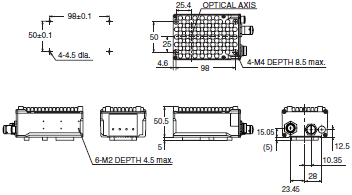
MOUNTING SCREW HOLES (2)
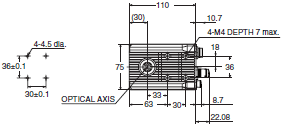
FQ-MS120-ECT/MS120-M-ECT
FQ-MS125-ECT/MS125-M-ECT
MOUNTING SCREW HOLES (1)
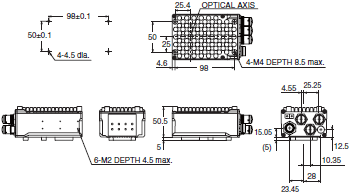
MOUNTING SCREW HOLES (2)
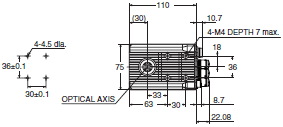
Touch Finder
FQ-MD30/MD31
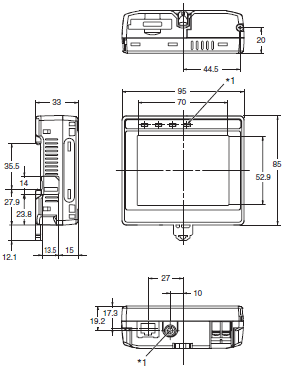
*1 Provided with FQ-MD31 only.
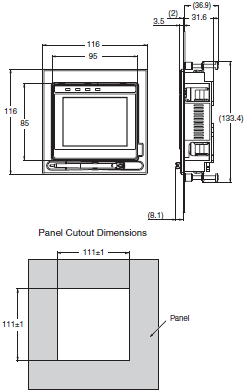
*2 The dimension of the panel mounting adapter does not include that of a FQ-MD[][].
Panel Mounting Adapter *2
Cables
For EtherCAT and Ethernet cable
Angle: M12/Straight: RJ45
FQ-MWNL005/010
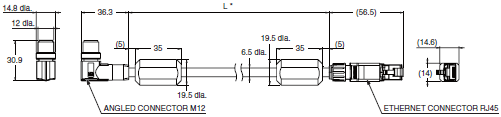
* Cable is available in 5 m/10 m.
Straight type (M12/RJ45)
FQ-WN005/010

* Cable is available in 5 m/10 m.
For EtherCAT cable
Angle type (M12/M12)
FQ-MWNEL005/010
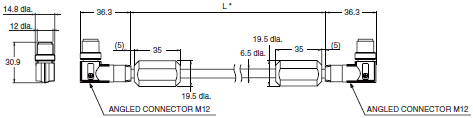
* Cable is available in 5 m/10 m.
Straight type (M12/M12)
FQ-MWNE005/010
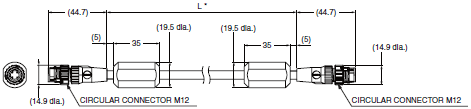
* Cable is available in 5 m/10 m.
I/O Cables
Angle type
FQ-MWDL005/010
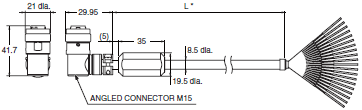
* Cable is available in 5 m/10 m.
Straight type
FQ-MWD005/010
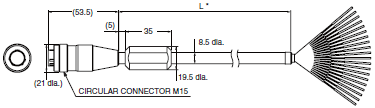
* Cable is available in 5 m/10 m.
last update: December 13, 2012
OMRON FQ-M Series catalog
FQ-M Series Vision Sensor/Catalog- Catalog
- Manual
- CAD
English
Global Edition
| Catalog Name | Catalog Number [size] | Last Update | |
|---|---|---|---|
 FQ-M Series Catalog FQ-M Series Catalog | Q183-E1-01 [4003KB] | Jan 05, 201820180105 | FQ-M Series Catalog |
| HMC-SD291/SD491 Data Sheet | - [300KB] | Jun 19, 201720170619 | HMC-SD291/SD491 Data Sheet |
OMRON FQ-M Series lineup
FQ-M Series Vision Sensor/Lineuplast update: January 5, 2018
Sensors
| Appearance | Type | Model | ||
|---|---|---|---|---|
 | Color | NPN | EtherCAT communication function not provided | FQ-MS120 |
| PNP | FQ-MS125 | |||
| Monochrome | NPN | FQ-MS120-M | ||
| PNP | FQ-MS125-M | |||
| Color | NPN | EtherCAT communication function provided | FQ-MS120-ECT | |
| PNP | FQ-MS125-ECT | |||
| Monochrome | NPN | FQ-MS120-M-ECT | ||
| PNP | FQ-MS125-M-ECT | |||
Automation Software Sysmac Studio
Please purchase a DVD and required number of licenses the first time you purchase the Sysmac Studio. DVDs and licenses are available individually. Each model of licenses does not include any DVD.
| Product name | Specifications | Model | Stand- ards | ||
|---|---|---|---|---|---|
| Number of licenses | Media | ||||
| Sysmac Studio Standard Edition Ver.1.[][] *2 | The Sysmac Studio is the software that provides an integrated environment for setting, programming, debugging and maintenance of machine automation controllers including the NJ/NX-series CPU Units, NY-series Industrial PC, EtherCAT Slave, and the HMI. Sysmac Studio runs on the following OS. Windows 7 (32-bit/64-bit version)/ Windows 8 (32-bit/64-bit version)/ Windows 8.1 (32-bit/64-bit version)/ Windows 10 (32-bit/64-bit version) This software provides functions of the Vision Edition. Refer to OMRON website for details such as supported models and functions. | --- (Media only) | DVD | SYSMAC-SE200D | --- |
| 1 license *1 | --- | SYSMAC-SE201L | --- | ||
| Sysmac Studio Vision Edition Ver.1.[][] | Sysmac Studio Vision Edition is a limited license that provides selected functions required for FQ-M-series and FH-series Vision Sensor settings. Because this product is a license only, you need the Sysmac Studio Standard Edition DVD media to install it. | 1 license | --- | SYSMAC-VE001L | --- |
*1 Multi licenses are available for the Sysmac Studio (3, 10, 30, or 50 licenses).
*2 The FQ-M series is supported by Sysmac Studio version 1.01 or higher.
Touch Finder
| Appearance | Type | Model |
|---|---|---|
 | DC power supply | FQ-MD30 |
| AC/DC/battery * | FQ-MD31 |
* AC Adapter and Battery are sold separately.
Bend resistant Cables for FQ-M Series
| Cable Type | Appearance | Type | Cable length | Model |
|---|---|---|---|---|
| EtherCAT and Ethernet cable (M12/RJ45) |  | Angle: M12/ Straight: RJ45 | 5 m | FQ-MWNL005 |
| 10 m | FQ-MWNL010 | |||
 | Straight type | 5m | FQ-WN005 | |
| 10 m | FQ-WN010 | |||
| 20 m | FQ-WN020 | |||
| EtherCAT cable (M12/M12) |  | Angle type | 5 m | FQ-MWNEL005 |
| 10 m | FQ-MWNEL010 | |||
 | Straight type | 5m | FQ-MWNE005 | |
| 10 m | FQ-MWNE010 | |||
| I/O Cables |  | Angle type | 5 m | FQ-MWDL005 |
| 10 m | FQ-MWDL010 | |||
 | Straight type | 5 m | FQ-MWD005 | |
| 10 m | FQ-MWD010 |
Accessories
| Appearance | Type | Model | ||
|---|---|---|---|---|
 | For Touch Finder | Panel Mounting Adapter | FQ-XPM | |
 | AC Adapter (for models for DC/AC/Battery) | FQ-AC[] *1 | ||
 | Battery (for models for DC/AC/Battery) | FQ-BAT1 *2 | ||
 | Touch Pen (enclosed with Touch Finder) | FQ-XT | ||
 | Strap | FQ-XH | ||
 | SD Card | 2GB | HMC-SD291 | |
| 4GB | HMC-SD491 | |||
*1 AC Adapters for Touch Finder with DC/AC/Battery Power Supply. Select the model for the country in which the Touch
Finder will be used.
| Plug type | Voltage | Certified standards | Model |
|---|---|---|---|
| A | 125 V max. | PSE | FQ-AC1 |
| UL/CSA | FQ-AC2 | ||
| 250 V max. | CCC mark | FQ-AC3 | |
| C | 250 V max. | --- | FQ-AC4 |
*2 The Battery uses a lithium ion secondary battery. Confirm any applicable laws and regulations in the destination
country if you export the Battery.
Industrial Switching Hubs for EtherNet/IP and Ethernet
| Appearance | Number of ports | Failure detection | Current consumption | Model |
|---|---|---|---|---|
 | 3 | None | 0.22 A | W4S1-03B |
 | 5 | None | 0.22 A | W4S1-05B |
| Supported | W4S1-05C |
Note: Industrial switching hubs are cannot be used for EtherCAT.
EtherCAT junction slaves
| Appearance | Number of ports | Power supply voltage | Current consumption | Model |
|---|---|---|---|---|
 | 3 | 20.4 to 28.8 VDC (24 VDC -15 to 20%) | 0.08 A | GX-JC03 |
 | 6 | 0.17 A | GX-JC06 |
Note: 1. Please do not connect EtherCAT junction slave with OMRON position control unit, Model CJ1W-NC[]81/[]82.
2. EtherCAT junction slaves cannot be used for EtherNet/IP and Ethernet.
Cameras peripheral devices
| Type | Model | Remarks |
|---|---|---|
| CCTV Lenses | 3Z4S-LE Series | Refer to Vision Accessory Catalog (Q198) |
| External Lightings | FLV Series | |
| FL Series |
last update: January 5, 2018
OMRON FQ-M Series specification
FQ-M Series Vision Sensor/Specificationslast update: November 01, 2016
Sensors
| Type | EtherCAT communication function not provided | EtherCAT communication function provided | |||
|---|---|---|---|---|---|
| Color | Monochrome | Color | Monochrome | ||
| Model | NPN | FQ-MS120 | FQ-MS120-M | FQ-MS120-ECT | FQ-MS120-M-ECT |
| PNP | FQ-MS125 | FQ-MS125-M | FQ-MS125-ECT | FQ-MS125-M-ECT | |
| Field of vision, Installation distance | Selecting a lens according to the field of vision and installation distance. Refer to the "Optical Chart" on Catalog. | ||||
| Main functions | Inspection items | Shape search, Search, Labeling, Edge position | |||
| Number of simultaneous inspections | 32 | ||||
| Number of registered scenes | 32 *1 | ||||
| Image input | Image processing method | Real color | Monochrome | Real color | Monochrome |
| Image elements | 1/3-inch color CMOS | 1/3-inch monochrome CMOS | 1/3-inch color CMOS | 1/3-inch monochrome CMOS | |
| Image filter | High dynamic range (HDR) and white balance | High dynamic range (HDR) | High dynamic range (HDR) and white balance | High dynamic range (HDR) | |
| Shutter | Electronic shutter; select shutter speeds from 1/10 to 1/30000 (sec) | ||||
| Processing resolution | 752 (H) ✕ 480 (V) | ||||
| Pixel size | 6.0 (μm) ✕ 6.0 (μm) | ||||
| Frame rate (image read time) | 60fps (16.7ms) | ||||
| External Lightings | Connecting method | Connection via a strobe light controller | |||
| Connectable lighting | FL series | ||||
| Data logging | Measurement data | In Sensor: Max. 32000 items *2 | |||
| Images | In Sensor: 20 images *2 | ||||
| Measurement trigger | I/O trigger, Encoder trigger, Communications trigger (Ethernet No-protocol, PLC Link, or EtherCAT) | ||||
| I/O specifi- cations | Input signals | 9 signals Single measurement input (TRIG) Error clear input (IN0) Encoder counter reset input (IN1) Encoder input (A±, B±, Z±) *4 | |||
| Output signals | 5 signals *3 OUT0 Overall judgement output (OR) OUT1 Control output (BUSY) OUT2 Error output (ERROR) OUT3 (Shutter output: SHTOUT) OUT4 (Strobe trigger output: STGOUT) | ||||
| Ethernet specifications | 100BASE-TX/10BASE-TX | ||||
| EtherCAT specifications | --- | Dedicated protocol for EtherCAT 100BASE-TX | |||
| Connection method | Special connector cables Power supply and I/O: 1 special connector I/O cable Touch Finder, Computer and Ethernet: 1 Ethernet cable EtherCAT: 2 EtherCAT cable | ||||
| LED display | OR: Judgment result indicator ERR: Error indicator BUSY: BUSY indicator ETN: Ethernet communications indicator | ||||
| EtherCAT display | --- | L/A IN (Link/Activity IN) ✕ 1 L/A OUT (Link/Activity OUT) ✕ 1 RUN ✕ 1 ERR ✕ 1 | |||
| Ratings | Power supply voltage | 21.6 to 26.4 VDC (including ripple) | |||
| Insulation resistance | Between all lead wires and case: 0.5 MΩ (at 250 V) | ||||
| Current consumption | 450mA max. (When the FL-series Strobe controller and lighting are used.) 250mA max. (When external lighting is not used.) | ||||
| Environ- mental immunity | Ambient temperature range | Operating: 0 to 50 °C, Storage: -20 to 65 °C (with no icing or condensation) | |||
| Ambient humidity range | Operating and storage: 35% to 85% (with no condensation) | ||||
| Ambient atmosphere | No corrosive gas | ||||
| Vibration resistance (destruction) | 10 to 150 Hz, single amplitude: 0.35 mm, X/Y/Z directions, 8 min each, 10 times | ||||
| Shock resistance (destruction) | 150 m/s2 3 times each in 6 direction (up, down, right, left, forward, and backward) | ||||
| Degree of protection | IEC60529 IP40 | ||||
| Materials | Case: alminium die casting, Rear cover: alminium plate | ||||
| Weight | Approx. 390 g (Sensor only) | Approx. 480 g (Sensor only) | |||
| Accessories | Instruction Manual | ||||
*1 The maximum number of resisterable scenes depends on settings due to restrictions on memory.
*2 If a Touch Finder is used, results can be saved up to the capacity of an SD card.
*3 The five output signals can be allocated for the judgements of individual inspection items.
*4 Encoder input specifications
Pulse input Specifications (When an open collector type encoder is used.)
| Item | Specification | |||
|---|---|---|---|---|
| Input voltage | 24 VDC ±10% | 12 VDC ±10% | 5 VDC ±5% | |
| Input current | 4.8 mA (at 24 VDC, typical value) | 2.4 mA (at 12 VDC, typical value) | 1.0 mA (at 5 VDC, typical value) | |
| NPN | ON voltage *1 | 4.8 V max. | 2.4 V max. | 1.0 V max. |
| OFF voltage *2 | 19.2 V min. | 9.6 V min. | 4.0 V min. | |
| PNP | ON voltage *1 | 19.2 V min. | 9.6 V min. | 4.0 V min. |
| OFF voltage *2 | 4.8 V max. | 2.4 V max. | 1.0 V max. | |
| Maximum response frequency *3 | 50 kHz (I/O cable: when the FQ-MWD005 or FQ-MWDL005 cables is used.) 20 kHz (I/O cable: when the FQ-MWD010 or FQ-MWDL010 cables is used.) | |||
| Input impedance | 5.1 kΩ | |||
*1 ON voltage: Voltage to change from OFF to ON state. The ON voltage is the difference of voltages between the GND
terminal of the encoder power terminals and each input terminal.
*2 OFF voltage: Voltage to change from ON to OFF state. The ON voltage is the difference of voltages between the GND
terminal of the encoder power terminals and each input terminal.
*3 Select maximum response frequency depending on length of the encoder cable and response frequency of the
encoder.
Pulse input Specifications (When a line-driver output type encoder is used.)
| Item | Specification |
|---|---|
| Input voltage | EIA standard RS-422-A line driver level |
| Input impedance *1 | 120 Ω ±5% |
| Differential input voltage | 0.2 V min. |
| Hysteresis voltage | 50 mV |
| Maximum response frequency *2 | 200 kHz (I/O cable: when the FQ-MWD005, FQ-MWDL005, FQ-MWD010, or FQ-MWDL010 cables is used.) |
*1 When terminating resistance function is used.
*2 Select maximum response frequency depending on length of the encoder cable and response frequency of the
encoder.
Touch Finder
| Type | Model with DC power supply | Model with AC/DC/battery power supply | ||
|---|---|---|---|---|
| Model | FQ-MD30 | FQ-MD31 | ||
| Number of connectable Sensors | 2 max. | |||
| Main functions | Types of measurement displays | Last result display, Last NG display, trend monitor, histograms | ||
| Types of display images | Through, frozen, zoom-in, and zoom-out images | |||
| Data logging | Measurement results, measured images | |||
| Menu language | English, Japanese | |||
| Indications | LCD | Display device | 3.5-inch TFT color LCD | |
| Pixels | 320 ✕ 240 | |||
| Display colors | 16,777,216 | |||
| Backlight | Life expectancy *1 | 50,000 hours at 25 °C | ||
| Brightness adjustment | Provided | |||
| Screen saver | Provided | |||
| Indicators | Power indicator (color: green) | POWER | ||
| Error indicator (color: red) | ERROR | |||
| SD card access indicator (color: yellow) | SD ACCESS | |||
| Charge indicator (color: orange) | --- | CHARGE | ||
| Operation interface | Touch screen | Method | Resistance film | |
| Life expectancy *2 | 1,000,000 operations | |||
| External interface | Ethernet | 100 BASE-TX/10 BASE-T | ||
| SD card | Omron SD card (Model: HMC-SD291/SD491) or a SDHC card of Class4 or higher rating is recommended. | |||
| Ratings | Power supply voltage | DC power connection | 20.4 to 26.4 VDC (including ripple) | |
| AC adapter connection | --- | 100 to 240 VAC, 50/60 Hz | ||
| Battery connection | --- | FQ-BAT1 Battery (1 cell, 3.7 V) | ||
| Continuous operation on Battery *3 | --- | 1.5 h | ||
| Current consumption | DC power connection: 0.2 A | |||
| Insulation resistance | Between all lead wires and case: 0.5 MΩ (at 250 V) | |||
| Environ- mental immunity | Ambient temperature range | Operating: 0 to 50 °C Storage: -25 to 65 °C (with no icing or condensation) | Operating: 0 to 50 °C when mounted to DIN Track or panel 0 to 40 °C when operated on a Battery Storage: -25 to 65 °C (with no icing or condensation) | |
| Ambient humidity range | Operating and storage: 35% to 85% (with no condensation) | |||
| Ambient atmosphere | No corrosive gas | |||
| Vibration resistance (destruction) | 10 to 150 Hz, single amplitude: 0.35 mm, X/Y/Z directions 8 min each, 10 times | |||
| Shock resistance (destruction) | 150 m/s2 3 times each in 6 direction (up, down, right, left, forward, and backward) | |||
| Degree of protection | IEC 60529 IP20 | |||
| Dimensions | 95 ✕ 85 ✕ 33 mm | |||
| Materials | Case: ABS | |||
| Weight | Approx. 270 g (without Battery and hand strap) | |||
| Accessories | Touch Pen (FQ-XT), Instruction Manual | |||
*1 This is a guideline for the time required for the brightness to diminish to half the initial brightness at room temperature
and humidity. No guarantee is implied. The life of the backlight is greatly affected by the ambient temperature and
humidity. It will be shorter at lower or higher temperatures.
*2 This value is only a guideline. No guarantee is implied. The value will be affected by operating conditions.
*3 This value is only a guideline. No guarantee is implied. The value will be affected by the operating environment and
operating conditions.
Battery Specifications
| Model | FQ- |
| Battery type | Secondary lithium ion battery |
| Nominal capacity | 1800 mAh |
| Rated voltage | 3. |
| Dimensions | 35. |
| Ambient temperature range | Operating: Storage: |
| Ambient humidity range | Operating and storage: |
| Charging method | Charged in Touch Finder ( AC adapter ( |
| Charging time * | 2. |
| Battery backup life * | 300 charging cycles |
| Weight | 50 g max. |
*1 This value is only a guideline. No guarantee is implied. The value will be affected by operating conditions.
*2 This is a guideline for the time required for the capacity of the Battery to be reduced to 60% of the initial capacity. No
guarantee is implied. The value will be affected by the operating environment and operating conditions.
Sysmac Studio
| Item | Requirement |
|---|---|
| Operating system (OS) *1, *2 Japanese or English system | Windows 7 (32-bit/64-bit version)/Windows 8 (32-bit/64-bit version)/ Windows 8.1 (32-bit/64-bit version)/Windows 10 (32-bit/64-bit version) |
| CPU | Windows computers with Celeron 540 (1.8 GHz) or faster CPU. Core i5 M520 (2.4 GHz) or equivalent or faster recommended |
| Main memory | 2GB min. |
| Hard disk | At least 1.6 GB of available space *3 |
| Display | XGA 1024 ✕ 768, 1600 million colors. WXGA 1280 ✕ 800 min. recommended |
| Disk drive | DVD-ROM drive |
| Communications ports | USB port corresponded to USB 2.0, or Ethernet port |
*1 Sysmac Studio Operating System Precaution:
System requirements and hard disk space may vary with the system environment.
*2 The following restrictions apply when Sysmac Studio is used with Microsoft Windows 7 or Windows 8.
Some Help files cannot be accessed.
The Help files can be accessed if the Help program distributed by Microsoft for Windows (WinHlp32.exe) is installed.
Refer to the Microsoft homepage listed below or contact Microsoft for details on installing the file. (The download
page is automatically displayed if the Help files are opened while the user is connected to the Internet.)
http://support.microsoft.com/kb/917607/en-us
*3 To use the file logging function, additional memory area to save the logging data is necessary.
FQ-M Series EtherCAT Communications Specifications
| Item | Specifications |
|---|---|
| Communications standard | IEC 61158 Type12 |
| Physical layer | 100BASE-TX (IEEE802.3) |
| Connector | M12 ✕ 2 E-CAT IN: EtherCAT (IN) E-CAT OUT: EtherCAT (OUT) |
| Communications media | Use the cables for FQ-MWN[][], or FQ-WN[][] series. |
| Communications distance | Use the communication cable within the length of FQ-MWN[][] or FQ-WN[][] series cables. |
| Process data | Variable PDO Mapping |
| Mailbox (CoE) | Emergency messages, SDO requests, SDO responses, and SDO information |
| Distributed clock | Synchronization with DC mode 1 |
| LED display | L/A IN (Link/Activity IN) × 1, L/A OUT (Link/Activity OUT) × 1, RUN × 1, ERR × 1 |
last update: November 01, 2016
- NO. FQ-M Series
- TYPE:Vision Sensors / Machine Vision Systems Smart Camera
 Copyright Statement
 - DATE:2021-06-09
- Associated products:
FQ2 Smart Camera/Features FLV Series Light Units/Features